

Design
QR code error correction explained
By OpenQR · updated 27 June 2026
8 min read · Updated 27 June 2026
What is QR code error correction?
Error correction is redundant data baked into a QR code so a scanner can still read it when some of it is unreadable. A QR code isn’t just your link painted as black and white squares — alongside the data, it stores extra recovery information. If a portion of the code is missing, damaged or covered, the scanner uses that recovery data to reconstruct the original message mathematically, with no loss. It’s the reason a QR code on a crumpled receipt or a rain-spotted poster still works first time.
This is defined by the QR standard, ISO/IEC 18004, and it’s built into every QR code ever made — you can’t turn it off. The only choice is how much redundancy to include, expressed as one of four error-correction levels.
The four levels: L, M, Q and H
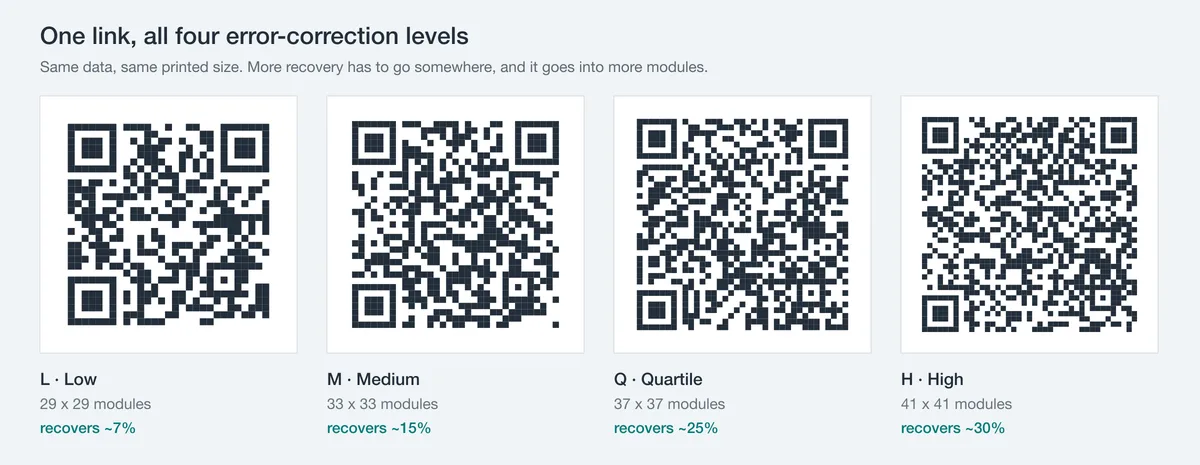
The four levels differ in one number: how much of the code’s data a scanner can rebuild if part of it is unreadable. Nominal recovery is about 7% at L, 15% at M, 25% at Q and 30% at H. More recovery is more robust, and it is not free (below).
| Level | Name | Recovers up to | Best for |
|---|---|---|---|
| L | Low | ~7% | Clean digital screens, very long data, maximum capacity |
| M | Medium | ~15% | Everyday print on clean surfaces — the common default |
| Q | Quartile | ~25% | Packaging, stickers, busier or coloured designs |
| H | High | ~30% | Logos, outdoor signage, dirty or scuffed surfaces |
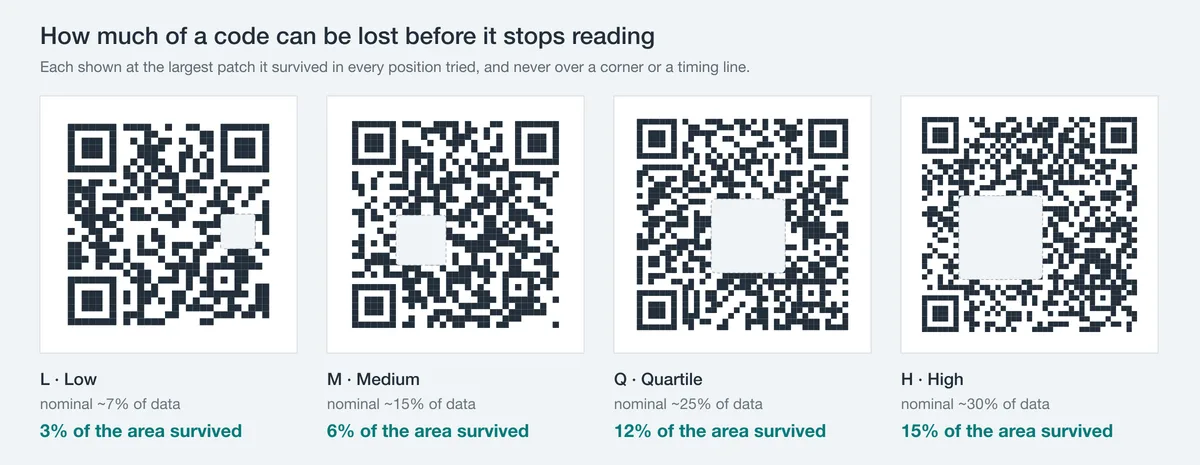
The percentages are the proportion of the code’s codewords (its data blocks) that can be lost and still fully recovered. Crucially, this is not the same as the area you can cover: a logo blanks a contiguous block of modules, only about half of which are dark and actually carry data, and a scanner still has to detect and sample the code before error correction runs at all. In real scans a code fails well before the nominal budget, so read the recovery percentage as a ceiling on lost data, not as a safe logo size (see below).
Why the recovery figures are approximate
Reed–Solomon corrects at the codeword level, and the exact recoverable fraction shifts slightly with the code’s version (size). The ~7/15/25/30% figures are the standard nominal values you’ll see quoted — close enough for every practical decision.
How Reed–Solomon redundancy works (in plain English)
The maths behind QR error correction is Reed–Solomon coding — the same family of algorithms that protects CDs, DVDs and deep-space transmissions from NASA probes. You don’t need the algebra, just the intuition.
Think of it like sending an important message and adding a set of carefully chosen checksums alongside it. Those extra values are calculated from the message so that any small group of them can stand in for missing pieces. If part of the message is lost, the receiver solves a set of equations using the checksums to work out exactly what the missing part must have been. Reed–Solomon is just a very efficient, mathematically guaranteed way of doing this.
- The encoder splits your data into codewords (8-bit blocks) and computes extra error-correction codewords from them.
- Both sets are woven into the QR grid — your message and its recovery data, spread across the modules.
- A scanner reads whatever it can and feeds it to the Reed–Solomon decoder.
- Lost or wrong codewords are reconstructed from the recovery codewords, as long as the damage stays within the level’s budget.
Reed–Solomon handles two kinds of problem: erasures (modules it knows are unreadable) and errors (modules it misread as the wrong colour). Crucially, the code doesn’t need to know where the damage is — the decoder finds and fixes it. That’s why a logo, a scratch or a glare spot anywhere on the code can all be absorbed by the same redundancy.
The real tradeoff: more correction means a denser code
Higher error correction is not a free upgrade. Those extra recovery codewords are real data that has to live somewhere — so the code needs more modules (the little squares). For the same content, a level-H code is physically denser than a level-L one: more, smaller modules packed into the grid.
Two consequences follow, and they’re the whole reason you choose a level rather than always maxing it out:
- Capacity drops. At a given code size, level H stores far less than level L. A long URL that fits comfortably at L might force a bigger code at H. Keep your encoded data short (especially the URL) and this matters less.
- You must print it larger. Denser modules need more physical area to stay crisp and scannable. A high-EC code shrunk onto a business card can have modules too fine for a camera to resolve — so it fails despite all that redundancy.
Higher isn’t automatically safer
It’s tempting to slam everything to level H. But if you then print it small, the gain in redundancy is cancelled out by modules that are too tiny to read. Match the level to the job, and size the printed code to suit. See our print-size guide.
Which level should you choose?
For most everyday codes, the default of M (medium, ~15%) is the right balance — robust enough for clean print, without bloating the code. Step up only when conditions warrant it.
A quick decision guide:
- 1
On-screen or short-lived? → L
A code shown on a clean digital display, or one carrying a lot of data, can use L to maximise capacity. Screens don’t get scuffed.
- 2
Normal print on a clean surface? → M
Flyers, slides, menus, a code in a clean document. The standard default and fine for the vast majority of uses.
- 3
Packaging, stickers or coloured design? → Q
Surfaces that get handled, curved or printed over busy artwork benefit from the extra ~25% headroom.
- 4
A logo, the outdoors, or rough handling? → H
Anything covering part of the code, or exposed to weather, dirt and scuffing, benefits from the extra recovery of level Q or H. Just remember the recovery figure is of data, not area: it does not license a logo covering 30% of the code.
Error correction and logos: why a logo needs Q or H
Adding a logo to the centre of a QR code works because of error correction. The logo simply covers some modules; as long as the covered area stays within the level’s recovery budget, the scanner rebuilds the hidden data and reads the code perfectly. This is the single most common reason to raise the level.
It is tempting to read “level H recovers ~30%” as “a logo can cover 30% of the code”, but the two are not the same thing. Recovery is measured in lost data codewords; a logo is measured in area, and a given area maps to far fewer changed codewords than its size suggests. Measured against a real decoder, a 29x29 code at level H took a centred mark up to 12% of its area, about 35% of its width, and failed at 14%. Raising error correction for a small centred logo still helps and does no harm, so OpenQR does it for you, but treat the safe size, not the EC level, as the real constraint.
OpenQR raises it for you
When you add a logo in OpenQR, the error-correction level is raised automatically so the code carries more recovery data. That helps, but it is not a blank cheque: keep the logo within the safe size above and it will scan on the widest range of readers.
Two things still matter even at high error correction: keep the logo small (about a third of the code’s width, roughly 10% of its area), and never let it touch the three corner squares, the finder patterns that tell a scanner where the code is. Centre placement keeps clear of them. Our guide to QR codes with a logo covers the full recipe.
Does error correction make a QR code expire or change?
No. Error correction is part of how the code is built — it has nothing to do with whether a code expires. OpenQR makes static codes that encode your link directly, so they work forever regardless of level. Raising the error correction only changes how much damage the code can shrug off, not its lifespan.
Always test the finished code
Whatever level you choose, scan the final design with three to five different phones, in normal and dim light, at the distance people will actually scan from. A code can carry plenty of redundancy and still fail if it’s printed too small or with weak contrast. If a code won’t scan, our guide to why QR codes don’t scan walks through the usual culprits.
Set the level and download free
OpenQR lets you make a code at any error-correction level and export it as PNG, SVG or PDF — at any size, with no watermark and no sign-up. Add a logo and it raises to level H automatically.
Generate a QR code below, customise it, and download it free — add a logo and error correction jumps to level H automatically.